
How much money and time does our diskless solution save?
Your PCs constantly need game updates, driver updates, and OS patches to run reliably. Instead of managing each PC by hand, with our solution, you simply update once. Plus, on reboot, all PCs revert to a pristine, secure state, preventing software damage & additional IT labor. Move the sliders below to see the difference.
That is about 0 hours back every month, and about $0 in payroll saved every month.
By hand: every update, someone touches all 30 stations
Diskless: update once, and every station has it
This is an estimate, and your numbers will differ. By hand, every gaming station needs every update. With diskless, game updates are installed once on the server and system updates, like a new video driver, once on a single PC, and every station gets them. A few changes still need hands-on time. Troubleshooting time, which diskless also cuts, is not included.
Centers Worldwide
Outages This Year
Hours a Day of Free, Unlimited Tech Support
Years In Business
Effective control and management of data are crucial for the successful operation of an esports and gaming facility. Utilizing specifically designed software such as CCBoot and iCafeCloud is essential for daily operations. These tools manage game title access across all PC systems, allow for robust security and controls, provide a customer-facing interface for user accounts and game selection, support software updates and patches, streamline the deployment of new game titles, and tag systems for maintenance, among many other features.
Enter reseller code GAMESYNC on ccboot.com for a lifetime discount on your monthly or annual licensing subscription! (Canada centers, use code GAMESYNCCA. Spain, use code GAMESYNCSP)
Watch This Video to See The Power of CCBootCloud in Action!
CCBootCloud: The Perfect Server-Based Management Software
Integrates seamlessly with the iCafeCloud computer club management program.
Core Benefits
- Saves Money & Time: Reduces hardware costs and simplifies maintenance.
- Centralized Updates: Update software and games on one master image, deploying instantly to all PCs on reboot.
- Single Image Management: Operate numerous PCs from a single, managed disk image.
- Pristine Client PCs: Each computer boots to a clean, optimized state every time.
- Fast & Secure: Delivers quick boot times and enhanced security by minimizing local vulnerabilities.
- Broad Compatibility: Works effectively with diverse hardware configurations and operating systems.
- Versatile Application: Ideal for any environment with multiple PCs, such as gaming centers, schools, or offices.
- Cost-Effective: Significantly cheaper than purchasing and maintaining individual hard drives for each PC.
Management Interface Advantages
- Efficiently manage disk images and savepoints (snapshots).
- Access detailed logs of system actions and errors for troubleshooting.
- Utilize data persistence options (write-back cache) within the image.
- View detailed information regarding individual PC usage.
- Support for mounting multiple disk images to a single client PC if needed.
- Control and manage all connected PCs conveniently from a central web-based panel.
Server-Side Advantages
- Reliable 24/7 operational technical support available.
- Built-in monitoring for server system load and performance.
- Instant client updates: Updating game or application files on the server image makes them immediately available to clients on the next boot.
- Contributes to increased speed and security for all connected client PCs.
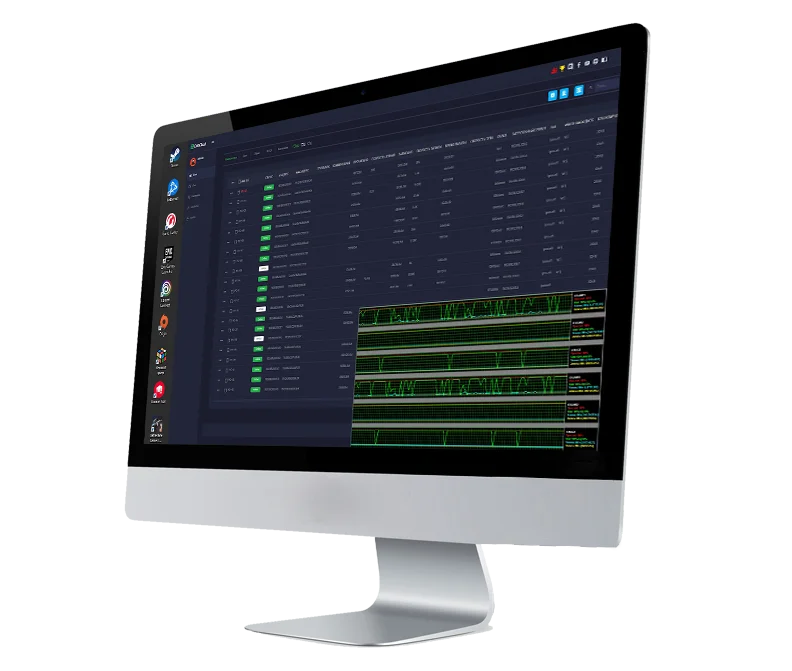


CCBootCloud Introduction
 Unless you’re prepared to waste countless hours constantly updating games on each PC in your network, then CCBoot is a must. Utilized by thousands of centers globally since 2007, this diskless solution uses an on-premise server with a shared games drive and images of each PC to keep your LAN in perfect order (note: we also build awesome CCBootCloud servers! Contact us for a customized quote.)
CCBoot's diskless solution streamlines maintenance. With CCBoot, you only need to install and configure the software on the server, along with a single boot image for each PC. Once this is done, all the client computers will be able to boot from that image. This allows you to easily update or change the games and other software and applications that are available on the client computers, as you only need to make the changes on the server. If a new game update comes out, simply update it on the server, and when the PC's are rebooted (or booted for the first time, for example, when you first open for the day), they will all have the update.
For a lifetime subscription savings, enter reseller code GAMESYNC on the Youngzsoft website (ccboot.com) when you order.
CCBootCloud is a gaming server and PXE boot software that manages and maintains your network of computers, purpose built for the shared computer environment of multiple PC's that gaming centers use as part of their core service offering. The software sits on top of a Windows operating system: we recommend Windows Server 2019 or later, as it's made for servers, but even Windows 10 or 11 can be used (not as ideal, one of the reasons being the frequent reboots for updates).
CCBoot streamlines the process of setting up and maintaining a network of computers, and helps massively reduce the time and resources needed to install and update games and other software on each individual computer.
An administrator, via a web interface, can control which games are installed on the computers, the accounts that are used for licensed games, as well as monitor and manage the PC's (shutdown, reboot, move a customer from one PC to another, etc). There are also a few basic tools for network monitoring to ensure smooth and stable game play.
One of the main benefits of using a CCBoot server in an esports center is that it allows multiple players to access and play games on different computers simultaneously without the need for local storage. This saves time and resources, as players can simply log in to the desktop, which has already booted to the server, and start playing - no need for staff members to install / update / troubleshoot the game on each individual computer. The server stores and manages all of the game data, which eliminates the need for local, individualized PC storage space.
Gamers want to be able to walk in to a center, sit down, log in, and start playing, without hassles or technical issues. By centralizing game data and software patches, drivers and other updates to one location, you can help ensure that games run smoothly for all players. This can be especially important in competitive gaming, where the latest patches and updates are critical to performance and access to the latest game content within the current development cycle.
 CCBoot allows you to boot multiple computers from a single image, rather than having to install and configure the operating system and software on each individual computer. This means that instead of installing the operating system and software on each discreet PC, you boot the client computers directly on to the CCBoot server.
Creating an Image
Here are the basic steps to creating an image of a PC. Note that this just has to be done once when you first deploy the server, and assuming your PC hardware is all the same, this one image will support every gaming station:
- Install fresh windows on a local ssd (use one of your client PCs)
- Perform a Windows update
- Install AIOruntimes
- Install critical programs that must be installed on a C drive and will not install to other drive letters, such as: Chrome, Firefox, Faceit, Discord, Ghub, Razer Synapse
- Update and optimize NIC driver
- Disable windows update using (stopupdates10) app (CCBoot will remove all updates after rebooting a PC anyway since each PC reverts to the previously saved state. If you keep windows update enabled, it will keep downloading the update every time after every restart and fill the server's writeback disk for no reason)
- Disable UAC
- Disable Windows Defender
- Install CCboot client
- Install client
- Upload the image
- Unplug the ssd from that PC
- Boot PC to server using the same image you just created.

Installing Games
Installing games on the server is fairly straightforward. Example of how to install Apex Legends:
1. Remotely connect to, or locally log in to, your server.
2. Install the Steam Launcher on the server and log in to steam website
3. Download installer to D:\installers folder
4. Launch installer and install to default path. Always use games disk, for example D: (not C:), for example: the game will be in d:\Steam\steamapps\common\apex (note: games like apex origin will be in program files). Note: iCafeCloud will apply game fixes to allow server updates and know where the game path is automatically.
5. Add game to iCafeCloud by enabling it in the games menu
6. If you want to add a house account to use with the game, create a license pool.
Note: any game that isn't natively supported, you can add manually. This is true for both online games that require an internet connection and offline games.
Feature Requests & New Upgrades
The development team at Youngzsoft has been fantastic to work with - they have listened to our feedback and ideas over the years, and have made numerous improvements to the software. If you have a feature in mind but you don't see it currently available in the product, contact us and we will make the recommendation directly to them (we have a great relationship with the product development team). To see what's been done over the years, check out this official changelog that we keep maintained on our website, with entries dating back many years.
The Ultimate Customer Interface for Your PC's
Enter reseller code GAMESYNC on the Youngzsoft website when purchasing licenses to reduce the monthly or annual cost!
iCafeCloud: Core Features
- Integrated Competitive Gaming Features (Tournaments/Leaderboards)
- Player Achievement Rewards System
- Personalized Game Setting Profiles (Save/Sync)
- In-Seat Time Extension & Purchases
- Reliable Local Network Operation
- Accessible Management Interface from Any Device
- Comprehensive Staff Management Tools
- Integrated Online Support Ticketing System
Advantages for Your Customers
- Centralized Access to PC Settings
- Purchase Time Packages & Cafe Items Directly from their Seat
- Participate in Paid-Entry Tournaments & Events
- Fully Customizable User Interface
- Convenient Access to Task Manager
- Fast Game Search & Launcher
- In-App Admin Call & Feedback System
- Ability to Lock PC Session Without Losing Time
- View Account Balance & Earned Rewards
- Clear Display of Remaining Session Time
- Customizable On-Screen Advertising Banners with Clickable Links
- Secure PC Access Control
- Visually Rich Game Library with Custom Covers
- Login with Personal or Guest Accounts
Advantages for Your Employees
- Accurate Console Rental Time Tracking
- Real-time Visual Map of PC & Console Status
- Integrated Point of Sale (POS) / Online Cash Register Management
- Efficient Staff Shift Management
- Track Expenses & Manage Cash Collections
- Manage Local & Global Ranked Events
- Tools for Customer Interaction (Assistance Requests, Balance Top-ups, Item Sales)
- Emergency "All-Stations Pause" Feature (e.g., for network outages)
- Customer Account Registration & Management
- Sell Cafe/Store Items via the Interface
- Game Installation & License Management Tools
- Comprehensive Event & Tournament Management
- Remote PC Management (View Status, Shutdown, Reboot, Remote Control)
- Detailed Logs of All Customer Actions
- Integrated Booking & Reservation System
Advantages for Owners
- Detailed Staff Shift Performance Reports
- Filterable Employee Performance Data & Analytics
- Comprehensive, Filterable Logs for Actions & Finances
- Categorized Financial Reporting Block
- Staff Scheduling Tools
- In-depth Sales Reports for Goods & Time Packages
- Analytics on Average PC Utilization & Game Launch Popularity
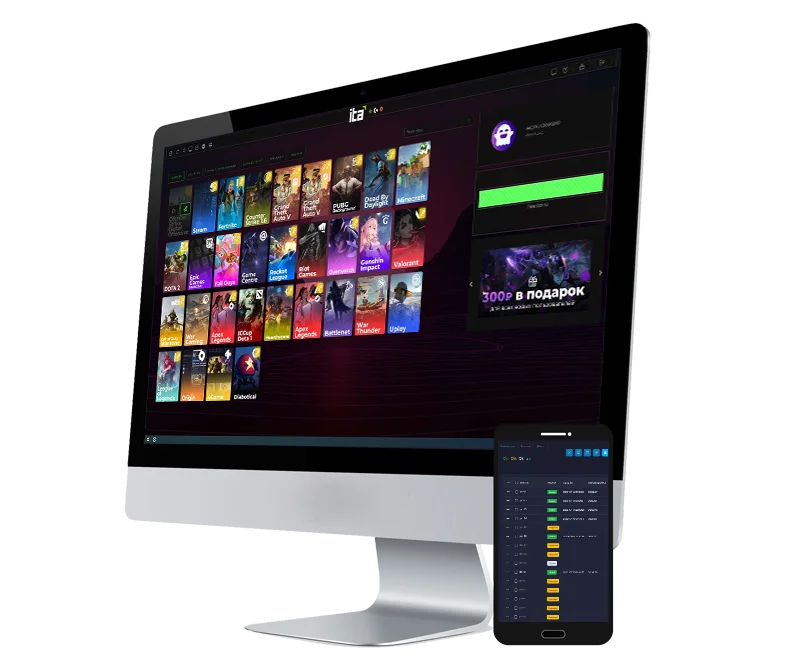

iCafeCloud is a simple yet powerful customer-facing solution to control and manage your center. It features game management and billing, to manage customer accounts and track usage, as well as game updates and licenses. To track all of this manually is incredibly complex - iCafeCloud simplifies everything, utilizing a clean, efficient user interface, installed on each PC. This also means that you don't need a dedicated PC for management, although we certainly recommend have a staff PC at your check-in desk that the counter help can use.
The administrator interface is web-based and allows management and monitoring from any device, using a standard browser. All the features you'd expect are there, including reports, point of sale features, customizable visual maps of your center's stations, and more.
The biggest advantages of using iCafeCloud are that it pairs perfectly with CCBootCloud, since both solutions are made by the same manufacturer, as well as the price. It's sold at an incredibly low cost, beating out the competition on this point alone.
iCafeCloud offers robust customer-facing features, simplifying tracking, game management, and overall system monitoring.
Save even more: enter reseller code GAMESYNC on the Youngzsoft website when purchasing licenses to reduce the monthly or annual cost!
We're Here to Help
Check out these common questions. If we haven’t answered yours, get in touch!
Does your software allow me to remotely manage and update the computers/games?
Absolutely. CCBootCloud has been designed with centralized, remote management in mind. Here are some of the key points:
- Centralized administration for the computers: You can manage every client computer on the network from a single, intuitive, web based admin panel/console. This means you can literally access the PC remotely from any browser and directly see what the customer sees, monitor system status and tasks, manage user sessions, and track performance across your network in real time.
- Remote updates & maintenance: The software lives on a local server, which enables administrators to remotely access it and pull software updates, game patches, and operating system updates via a "superclient" mode". All of this can be done without needing to be on-premise. Game updates can even be automated. (Note: we have been building and deploying custom CCBoot servers, contact us if you're interested in a quote!).
- Real-Time monitoring & alerts: Depending on how your server is configured, you can also stay informed with real-time notifications about system health and other statuses, allowing you to promptly address any issues that may arise. (Note: we build and design racks with smart UPS monitoring, contact us if you're interested in a quote!).
- Scalability: Whether you’re managing a handful of computers or multiple locations, the remote management features scale seamlessly, making it ideal for distributed environments like schools or multi-branch gaming centers.
Will this solution allow players to log into their own accounts for games that require it?
Yes, the software is designed to support personalized user experiences, including individual logins for games that require them:
- User account integration: Players can log in to their personal game accounts through the system. The software supports standard authentication processes, ensuring that users can access their profiles and game progress as needed. If they don't have an account to log in, house accounts can be provided and made available via the customer's client interface, making it easy to choose a house account if desired.
- Customizable login options: In environments like esports centers or educational settings, administrators often desire to have in-house user accounts that are used to track time. The software allows you to configure user profiles, manage session times, and enforce security protocols (for example, restricting USB access). This setup allows each user to have a personalized experience while maintaining a secure and controlled environment. You can even allow account registration from the desktop PC itself (in addition or in lieu of a front desk check-in, customer service area).
- Seamless transition between games: Once logged in, players can move between games on the same platform that require personal accounts (for example, Steam) without needing to re-enter credentials repeatedly, thereby streamlining the user experience.
- Parental controls & restrictions: For environments that need them, such as schools or family-oriented centers, the software can integrate additional management features (like time limits or content filters) linked to user profiles. For example, certain game titles can be accessed for ages 13 and up, while anyone who logs in under that age would not be able to see those titles in their library menu.
Are we able to manage all computers across multiple venues from one console?
Yes, managing multiple computers across various locations from a single console is one of the core strengths of the solution. However, it operates in a distinct way to ensure both centralized license management and effective on-site control:
-
Centralized licensing: Each venue—whether it’s a center, school, or any other facility under an umbrella organization—has all its licenses centrally tied together under one account. This setup streamlines license management, making it easier to oversee and update licenses across the entire organization.
-
Separate venue management: Despite the centralized license management, each local area network (LAN) is treated as a separate venue. In practical terms, if you wish to manage multiple sites simultaneously, the simplest approach is to open a browser tab for each location. Each tab operates with the same commands and actions, ensuring fast and efficient management across all venues.
-
Future global panel options: While the current system treats each on-premise server (located in different buildings or physical locations) separately due to distinct network topologies and hardware configurations, there is potential for further integration. we work closely with the software manufacturer to develop additional features, so if a global panel becomes a necessity, it could be developed in the future. However, given the typical separation of on-premise deployments, keeping each instance independent usually makes the most sense, and is what administrators have told us they prefer.
What does your pricing structure look like?
The solution is offered exclusively through a subscription model, providing you with flexibility, ongoing free live chat support and remote assistance, and regular (typically weekly) security and feature updates. Here’s a detailed breakdown of the pricing structure and available discount options (tip: there's potentially at least three discounts that can be stacked):
-
Subscription Options:
- Monthly or Annual Plans: You can choose to pay on a monthly basis, or save more with an annual subscription. Depending on how many PC's you're deploying, the annual option offers potentially a significant discount compared to the monthly rate, making it a cost-effective choice for long-term deployments.
-
Modular Licensing:
- Pricing is designed to be modular to best fit your needs. You can opt for licenses that include just the CCBoot server, the integrated solution of CCBoot plus iCafeCloud (often referred to as CCBootCloudX), or even a configuration that includes CCBoot without iCafeCloud while still providing time/account usage tracking for consoles like Xbox and PlayStation.
- Most customers tend to choose the integrated CCBootCloudX solution, as it not only offers comprehensive functionality but also comes with an additional discount.
-
Discount Opportunities:
- Coupon Code – GAMESYNC: For USA centers, you can further reduce your subscription cost (for life!) by entering the coupon code GAMESYNC in the reseller field. (For centers outside of the USA, please contact us directly to learn about available discount options. We have more codes available, including GAMESYNCCA for Canada and GAMESYNCSP for Spain)
- Annual subscription savings: Opting for an annual subscription inherently provides a discount over monthly payments.
- Volume discounts: Educational and other institutions and businesses may qualify for additional volume discounts depending on the number of seats or licenses required.
-
Aggressive Pricing for the USA Market:
- The license pricing is extremely competitively positioned for the USA market, as detailed on the CCBoot website, ensuring you receive excellent value without compromising on quality. We believe it's easily the best price vs performance ratio of any manufacturer, that's why we recommend it!
Please let us know if you have further questions or if you'd like a tailored quote based on your specific deployment needs.
If we want to add more computers or locations, will this affect pricing?
With the subscription model, the price remains consistent on a per-computer or per-location basis regardless of the number of venues or PCs you add. This means that whether you're operating a single venue or multiple locations, you’ll be charged the same standard rate for each license (see above question for information on stacking multiple discounts together to achieve the lowest price).
However, for deployments that reach a significantly large scale, we do offer the possibility of volume discounts. If your network grows to include a large number of venues or PCs, please feel free to contact us for a customized quote. We’re always happy to work with our customers to tailor our pricing to fit the scope of their deployment while ensuring you receive the best value possible.
What does setting up this software look like? How does your trial period work?
Getting started with our recommended solution is straightforward and risk-free. To kick off your experience, simply contact us to set up a free trial. Here’s how it works:
-
Free Trial Initiation:
- Reach out to us, and we’ll promptly help you get set up with a free trial account and license.
- You can test the system by using one PC as a server and another as a client. If you already have a dedicated server (ideally, one that's not in use), you can leverage that for testing purposes.
-
Trial Duration & Flexibility:
- The trial period lasts 30 days, giving you ample time to explore and evaluate the software.
- If you need more time for an extended evaluation, we can easily extend the trial period to ensure you’re completely comfortable with the solution.
-
Step-by-Step Setup Process:
- Install the CCBoot Software: Begin by installing the CCBoot software on your designated server. This forms the backbone of your deployment.
- Create a Boot Image: Next, create a boot image for the client PC. Once the PC initiates a PXE boot, it will connect to the server and load the operating system, drivers, and other essential components.
- Configure icafecloud Settings: With the basic system up and running, you can then configure the games menu and other settings within icafecloud. This platform offers a high degree of customization:
- Customizable User Interface: Venues can develop their own customer interfaces, de-brand the Youngzsoft branding, and tailor the user login screen, background visuals, and promotional displays.
- Advanced Features: icafecloud also supports features such as tracking game performance via leaderboards, adding an extra layer of engagement for your users.
-
Comprehensive Support:
- Even during the free trial, full software support is provided at no extra cost. The manufacturer offers extensive documentation, a detailed wiki, instructional videos, live help chat, and remote support to guide you through each step.
- We’re committed to ensuring that your initial setup is smooth and successful. We work with the software manufacturer, who will invest the necessary time and resources to help you get the software up and running—completely without any obligation or commitment on your part.
The trial is designed to give you a complete, hands-on experience of the power and stability of the solution. With everything provided free initially, you have nothing to lose and a robust, customizable, stable, and performance-optimized (translation: fast!) platform to gain.
If we want to install new games on each computer, how would we go about this?
The beauty of our solution is that nothing is installed on each individual PC—everything is managed centrally through your on-premise server. Here’s how it works:
-
Centralized Installation:
All games are installed directly on the server, which serves as the central hub. Once a game is installed, it resides on centralized storage that every connected PC accesses. There’s no need to push installations to each PC individually. -
Easy Integration with iCafecloud:
After installing a game on the server, you simply add it to the icafemenu—the centralized menu system for iCafecloud. (Note: this process can be managed from any browser, not necessarily from the server itself, ensuring ease of use and flexibility in administration). -
Bandwidth Efficiency:
Since the game is downloaded or updated only once on the server, every PC on the LAN accesses the same centralized copy. This design maximizes bandwidth efficiency and minimizes network load during installations or updates. Your venue can get by with far less bandwidth than otherwise. -
Automated Updates:
Game updates are typically handled by the game’s own launcher (for instance, Steam’s auto-update feature). This means you don’t need to manage updates manually for each PC; the process is streamlined and centralized. -
Access Restrictions:
You have the flexibility to control game access. Whether you need to restrict games by age, membership level, or even by specific physical locations (limiting certain games to designated PCs), these options are fully supported within the system.
With our centralized approach, you install and manage games on a single server, and every connected PC benefits from the installation—making management simple, efficient, and highly customizable. If you’re interested in optimizing your server setup for the fastest and most reliable performance, please contact us for a tailored quote.
Does this require any specific hardware set up?
Yes, there are a few hardware considerations to ensure optimal performance for both client PCs and the server:
-
Client PCs:
- Gaming and Business Applications: While a modern gaming PC is recommended for gaming applications to ensure a smooth experience, any modern PC can work effectively. This infrastructure is versatile enough to support regular business applications as well.
- Detailed Guidelines: We provide comprehensive guidelines outlining the minimum and recommended specifications for client PCs, so you can be confident that your hardware meets the necessary requirements.
-
Server Requirements:
- Manufacturer vs. Recommended Specs: Although the manufacturer’s minimum server requirements are relatively modest, our experience in deploying servers worldwide has led us to recommend an enterprise-grade solution. We build our servers with high-quality enterprise motherboards, RAM, chassis, redundant systems, and enterprise drives to ensure exceptional stability and minimal downtime.
- Reliability and Peace of Mind: Our enterprise-tier server solutions have a proven track record spanning well over a decade of deployments. Investing in robust server hardware is essential, as the server is the backbone of the LAN; if it goes down, the entire network is affected. We offer free consulting services to quote and deploy a solid server solution tailored to your needs, ensuring continuous operation and peace of mind.
-
Network Requirements:
- High-Speed Connectivity: It’s critical that the server connects to your network switch using high-speed links—typically 10Gig copper, SFP+, or even 25Gig connections, depending on how many PC's you have. This is to handle the data load efficiently and prevent bottlenecking, as well as to future-proof your network if you decide to add more PC's later. Technically, you can even do it with standard NICs, depending.
- Additional Networking Solutions: We also sell networking equipment that integrates seamlessly via a cloud interface for streamlined network management. If you’re interested in enhancing your network infrastructure, please contact us for a customized quote.
-
Overall Compatibility:
The software is designed to work with a wide range of hardware configurations. If you have any concerns about your current setup or need advice on hardware optimization, our technical team is happy to perform a compatibility check and provide tailored recommendations.
Are we limited to games & software that iCafeCloud supports or can we install anything we want?
The platform offers extensive flexibility regarding the software you can deploy:
-
Supported Software:
iCafeCloud comes with a pre-defined menu featuring over a thousand placeholders for popular applications and games (and it is always growing). These entries are fully pre-configured in iCafemenu, complete with default pathways, server settings, and even thumbnails and promotional posters/digital artwork. This curated selection makes it easy to get started quickly. -
Custom Installations:
You’re not limited to the pre-configured titles. You can install any third-party applications and games, provided they are compatible with Windows. This means you can tailor the system to meet your specific needs or preferences beyond the default offerings. -
Centralized Management Benefits:
Regardless of whether the software is part of the pre-configured menu or a custom installation, you can manage updates, monitor usage, and deploy configurations centrally. This ensures a consistent and efficient environment across all connected machines. -
Licensing & Compliance:
While the system is highly flexible, it’s important to ensure that any third-party software you install complies with its own licensing terms. We recommend reviewing and verifying the licensing requirements for any additional software to guarantee smooth operation and adherence to legal standards.
How soon will I hear back from you?
We typically respond to inquiries within just 2-3 hours!
Help me save money! How do I get a discount in my country?
If you've made it this far, here's our gift to you: coupon codes to reduce your license cost! We support centers worldwide. Each coupon code is region-based. Please enter this into the reseller window when purchasing your license:
USA: enter code GAMESYNC
Canada: enter code GAMESYNCCA
Spain: enter code GAMESYNCSP
For any other countries, please contact us!
Request Your Free Trial or Book a Demo
See why CCBoot + iCafeCloud is the world's best PC LAN management software solution
 We never share your info.
  We respond within 3 hours.